Venngo MemberPerks®
Save money when you shop!

Discover MemberPerks® for CPHR BC & Yukon!
Your gateway to premium perks! Enjoy privileged access to exclusive discounts from leading global and national brands to trusted local favourites.
Get started today!
How to create an account
- Activate your account
- Visit cphrbc.venngo.com
- Sign up
- Add your information
- Set your location
- See perks near you and start saving
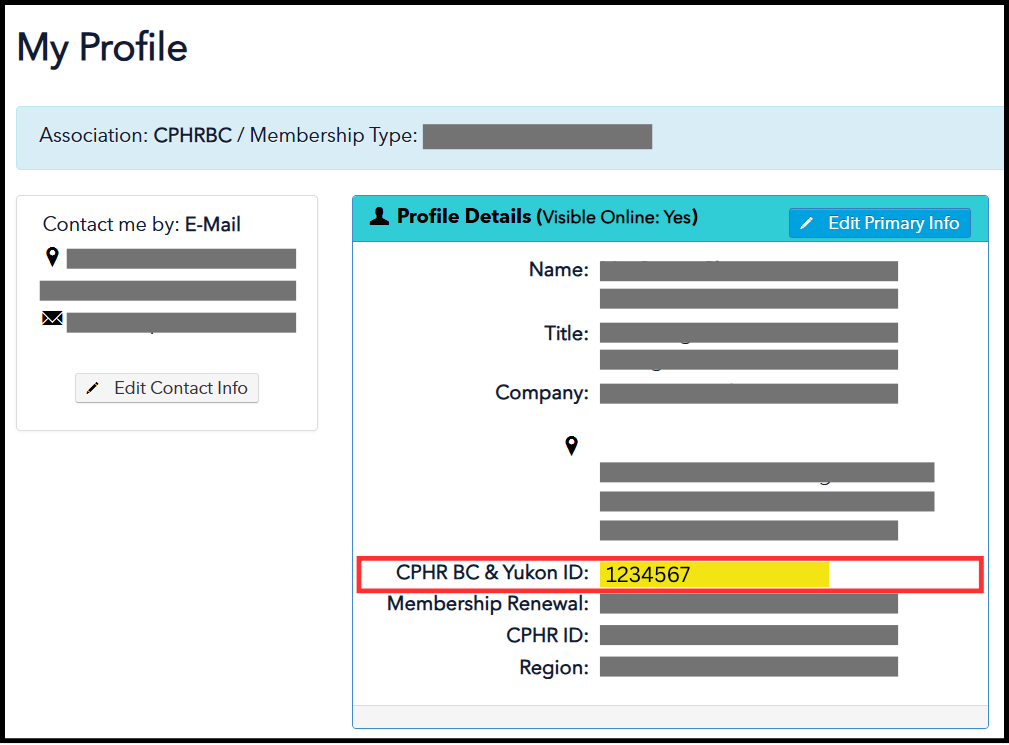
Find your Member ID
Need help finding your CPHR BC & Yukon Member ID?
- Log in to the Member Portal with your credentials.
- Find this information under “My Profile.” (See example below.)
Where to go
Web and mobile: cphrbc.venngo.com
App Store and Playstore: search for “Venngo”
Downloadable resources
MemberPerks FAQs
What is MemberPerks®?
As one of your member benefits, CPHR BC & Yukon is offering MemberPerks® to you and your family, a premium discount program with categories such as automobiles, electronics, entertainment, fashion, food & drink, health, home & living, pets, sports & recreations, and travel essentials across North America.
How can I use MemberPerks®?
You can use MemberPerks® on your personal desktop or mobile app. MemberPerks® is intuitive,
you can make it your own by saving addresses that matter to you, so that when you are on the
move, you can see what perks are available where you are. You can mark your favourite brands,
so when perks are available, you’ll be the first to know. Additionally, you can share the perks with
up to five family members by inviting them on the app. To redeem perks, make sure you look at
the redemption methods. They currently have four main types of redemption methods: by email, by phone, in-store and online.
Why use MemberPerks®?
You have access to a large number of locations from big brands to local shops across all of Canada, offering real discounts. MemberPerks® offers frequent short-term promotions to help you save even more. Perks are highlighted on the app during festive seasons to make sure you don’t miss any hot deals! New perks are added on a regular basis. The support team is readily available for all your questions and issues.
How does the Venngo Browser Extension work?
When installed, the browser will automatically detect when perks are available, and you can simply click on the notifications to use the perk. Follow the browser extension instructions to help you set up the browser extension.
I forgot my password.
You can request to have your password reset.
- Visit cphrbc.venngo.com by following the link or typing the address into your browser.
- Click the “Need help signing in?” link located in the sign in pod at the top of the page.
- In the “forgot your password” pod enter your MemberPerks® account email address in the “Enter your email address” field.
- An email will be sent to you with the instructions and a link to create a new password for your account.
I forgot my username.
To request your account name:
- Visit https://cphrbc.venngo.com by following the link or typing the address into your browser.
- Click the “Need help signing in?” link located in the sign in pod at the top of the page.
- In the “forgot your username?” pod enter your MemberPerks® account email address in the “Enter your email address” field.
- An email will be sent to you with your account information.
I forgot my username and password; how can I log in?
Please contact them via the help centre.
Need help? Have questions?
Visit the Help Centre from Mon. to Fri. 9 AM to 5 PM EST. You can also email support at [email protected].